Help support TMP


"15mm woodland MARPAT tutorial " Topic


7 Posts

All members in good standing are free to post here. Opinions expressed here are solely those of the posters, and have not been cleared with nor are they endorsed by The Miniatures Page.

Please do not post offers to buy and sell on the main forum.

For more information, see the TMP FAQ.


Back to the SF Painting Guides Message Board

Back to the Modern Gallery Message Board

Back to the Modern Painting Guides Message Board

Back to the Painting Message Board

Back to the 15mm Sci-Fi Message Board


Areas of Interest

General
Modern
Science Fiction

Featured Hobby News Article


Featured Link


Top-Rated Ruleset

A Fistful of Kung Fu


Rating: gold star gold star gold star gold star gold star gold star gold star 


Featured Showcase Article

MEA Infantry Squad [BEvo]

The Editor snaps some photos of the pre-painted Middle Eastern infantry from Mongoose's new game, Battlefield Evolution.


Featured Workbench Article

Megatroid the Third

If the army list permits a third Battle Mech… why not?


Featured Book Review


Featured Movie Review


3,331 hits since 2 Jun 2012
©1994-2026 Bill Armintrout
Comments or corrections?

SirFjodin02 Jun 2012 6:23 a.m. PST

picture

Due to a demand on TMP forum, I decided to show you how do I paint 15mm woodland MARPAT step-by-step. Final goal is to make 15mm Peter Pig soldier to look like marines from above photo.
Please bear in mind that this is my very first painting tutorial and also I am not professional macro photographer. So there could be some imperfections.

picture

The main problem with 15mm camouflages is that if you paint authentic 1/100 camo, model will blend with wargame terrain. So I prefer to paint cartoony version of camouflages.

picture

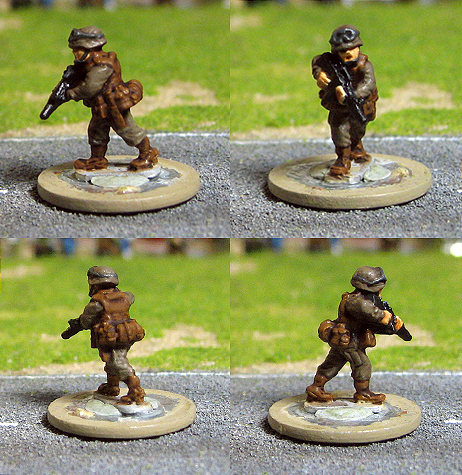
STEP1: I paint uniform using Baneblade Brown (Khemri Brown), for skin I use Kislev Flesh (Elf Flesh), for boots and equipment I use Balor Brown (Snakebite Leather), Abaddon Black (Chaos Black) for M16 and Mechanicus Standard Grey(Adeptus Battlegrey) for goggles.

picture

Wash model with Agrax Earthshade (Devlan Mud). For skin I use Seraphim Sepia (Gryphonne Sepia). For goggles I use Nuln Oil (Badab Black).

picture

Now we have bigger photos :) Highlight clothing with Baneblade Brown (Khemri Brown), highlight skin with Kislev Flesh (Elf Flesh), for boots and equipment use Balor Brown (Snakebite Leather)

picture

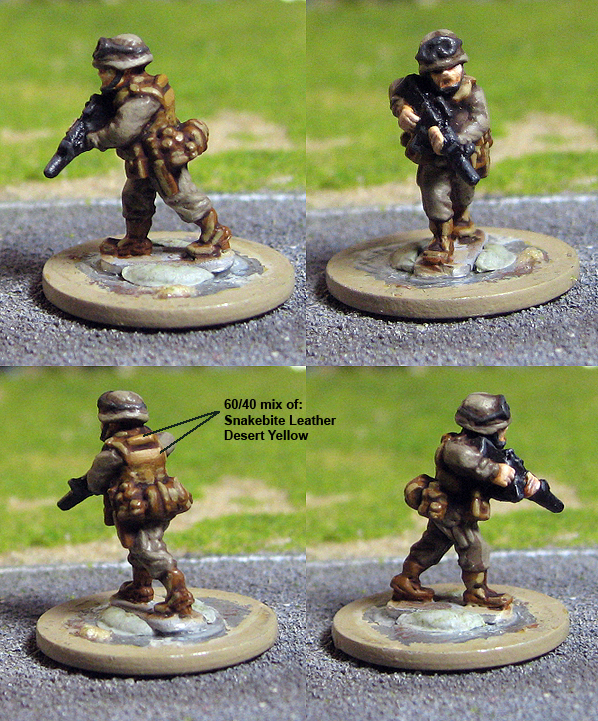
Now we need to add one more layer of highlights. Highlight equipment with Tallarn Sand (Desert Yellow). Use 60/40 mix of Balor Brown (Snakebite Leather) and Tallarn Sand (Desert Yellow) to highlight soldiers back. To highlight his uniform use 70/30 mix of Karak Stone (Kommando Khaki) and Baneblade Brown (Khemri Brown). Highlight skin with 50/50 mix of Kislev Flesh (Elf Flesh) and White Scar (Skull White). Highlight M16 with Mechanicus Standard Grey (Adeptus Battlegrey).

picture

Final touches! Highlight his M16 and goggles with Dawnstone (Codex Grey). Paint green stripes with 50/50 mix of Warboss Green (Goblin Green) and (Knarloc Green), but remember there are always options what green paint to use for these stripes. Last thing you need to do is to paint black dots :)

Blog link:
link

SpleenRippa02 Jun 2012 8:20 a.m. PST

This is great- thanks for putting in the time and effort! :)

Eclipsing Binaries02 Jun 2012 8:26 a.m. PST

You make it look so easy :(

I can never get camoflage to look okay on clothing, and if I do, it's only the once and I can never achieve the same again.

john lacour02 Jun 2012 9:02 a.m. PST

very nice indeed!

monkeychild02 Jun 2012 9:32 a.m. PST

Going to have to try that, I know for a fact its not going to come out half as nice as those though.

Lfseeney03 Jun 2012 1:12 p.m. PST

Thank you,
They look good, and showing how is very helpful.

11th ACR26 Jun 2012 10:59 a.m. PST

Sorry - only verified members can post on the forums.